Your clients’ data doesn’t belong in ChatGPT.
Now it doesn’t have to.
Stript finds and replaces personal data in your documents (names, addresses, IBANs, everything) so you can use any AI tool without exposing personal data. Runs entirely on your machine. Purpose-built for German and English documents.
Your data never touches a server. Not even ours.
See it in action
Stript detects personal data and replaces it with consistent pseudonyms, automatically.
This happens entirely on your machine. No cloud. No API. Just local AI.
The privacy gap in AI adoption
It’s happening in your organization right now.
Right now, someone in your organization is pasting a client contract into ChatGPT. An HR report into Claude. A financial audit into Gemini. They know the risks but do it anyway, because the productivity gain is irresistible.
You can’t ban AI. But you can make it safer.
How it works
From a sensitive document to safe AI use and back, four steps, entirely on your machine.
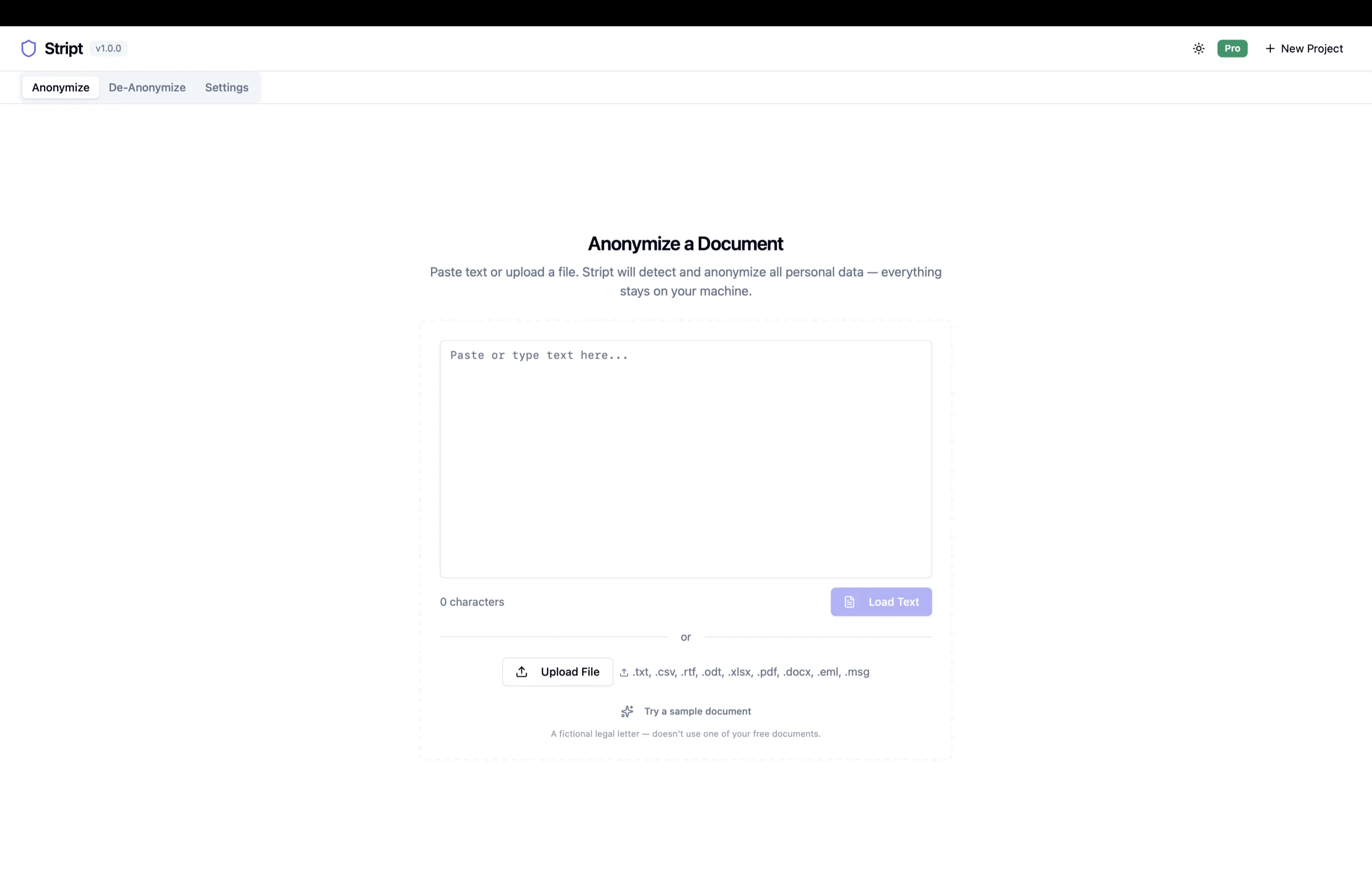
1. Add your document
Paste text or drop in a PDF, Word, Excel, CSV, RTF, ODT, email (.eml/.msg), or scanned document. Nothing is uploaded. Everything opens locally.
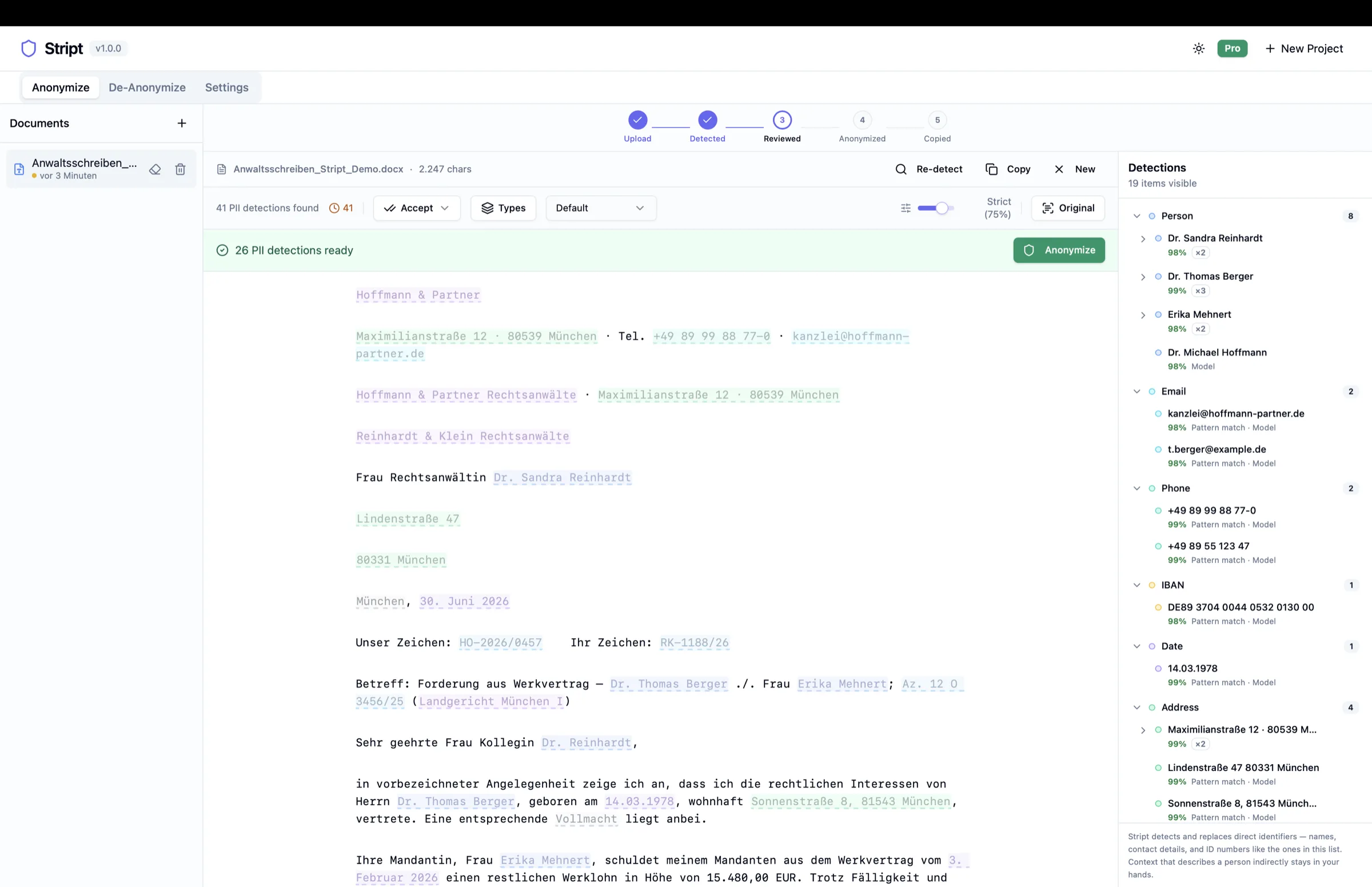
2. Review what's detected
Stript highlights names, addresses, IBANs, case numbers and more, and tells apart what is truly personal from public names like courts. You can confirm, reject, or reclassify any of them with one click, or adjust the confidence threshold.
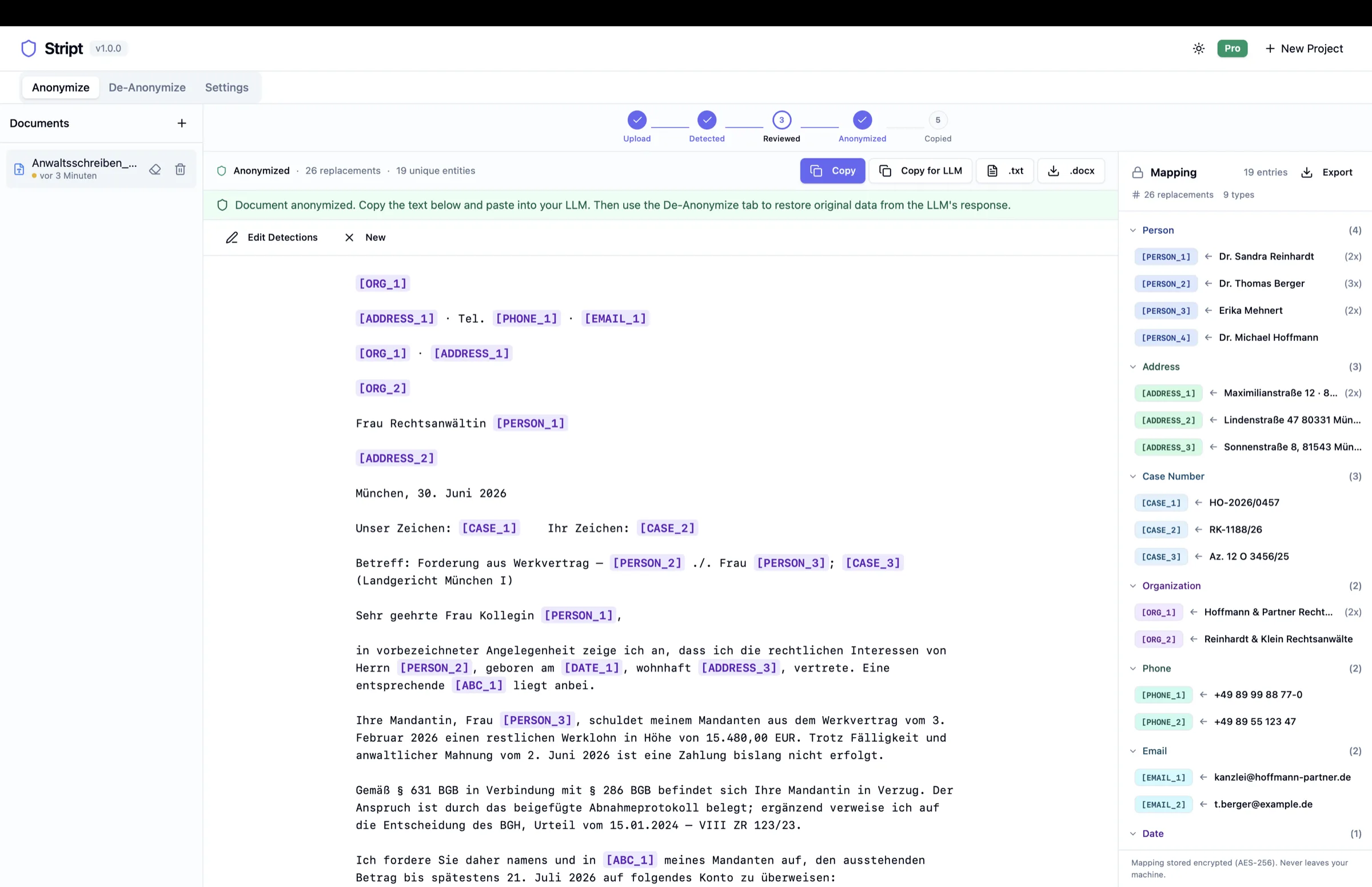
3. Anonymize and use any AI
Consistent placeholders replace the data. Copy it into your LLM, or export a real .docx or .pdf that keeps the original layout. The mapping stays encrypted on your device.
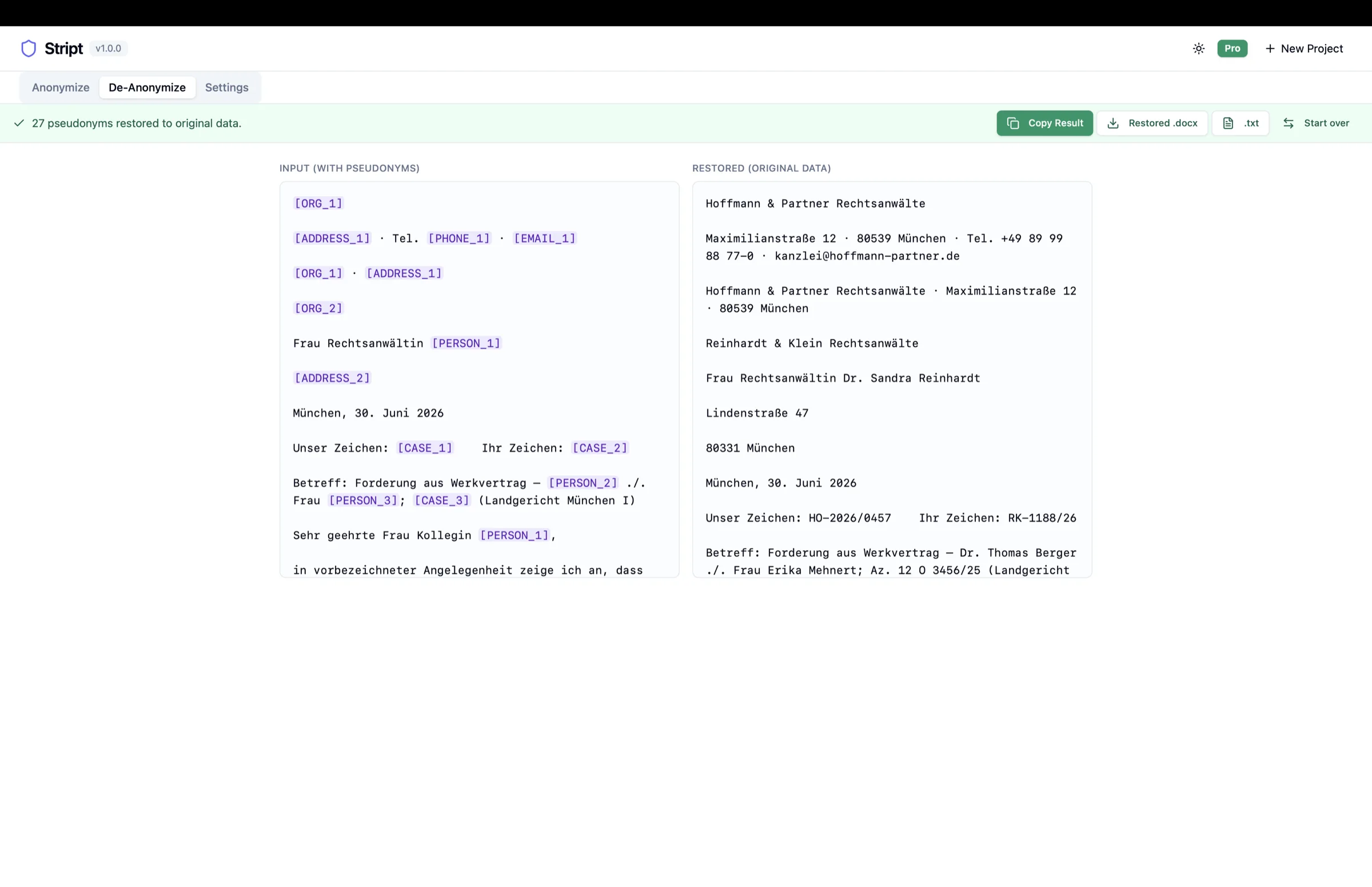
4. Restore the originals
Paste the AI's answer back and your real data is returned, including a format-preserving .docx. Reversible by design.
Format-preserving export
Copy and plain text are always available. When you need the original back exactly, Stript can also export a real Word or PDF with the layout, tables, and formatting kept intact.
Works with Claude Desktop and Claude Code
Use Stript inside Claude
Hand documents to Stript straight from the chat. Anonymization runs on your machine, and only the anonymized text enters the conversation.
Point Claude at the file
Give Claude the file path instead of attaching the document. Claude asks Stript for an anonymized version, so the original never enters the chat.
Review in Stript
In review mode the document opens in Stript on your machine. You check the detections and decide what is shared, exactly as in the app.
Restore locally
Claude works with placeholders like [PERSON_1]. The finished answer is restored on your device and written to your clipboard or a local file, never into the chat.
A clear boundary, enforced by design
Stays on your machine
- The original document
- The mapping between placeholders and real data
- The restored answer with the real data
Enters the conversation
- The anonymized text with placeholders
- Your questions and Claude's replies about it
The connection is local-only, opt-in, and off by default. Files you attach to a chat directly still go to the AI provider as is.
How to set it upReal AI on your machine, not another cloud wrapper
Most anonymization tools cut corners. Stript doesn’t.
Simple find & replace
Basic tools search for keywords and patterns. They miss names in context, catch false positives, and can’t tell ‘Berlin’ the city from ‘Berlin’ the client.
Cloud AI service
Some tools send your documents to an API for analysis. That defeats the purpose: your sensitive data still leaves your machine and lands on someone else’s server.
On-device NLP that understands context
Stript runs multiple AI models directly on your computer. It reads each sentence the way a person would, so it knows your client ‘Lisa Weber’ is personal data, but the court ‘Amtsgericht München’ isn’t. No data leaves your machine, ever.
Same words, different meaning: Stript judges by the sentence.
Name
Date
Address
Three analysis layers. Zero cloud dependencies. Every model runs on your hardware.
Who is Stript for?
Built for professionals who handle sensitive data every day.
Data Protection Officers
Give your teams a compliant way to use AI, instead of fighting a losing battle against shadow IT.
AI guidance for DPOsLawyers & Legal Teams
Summarize contracts, draft letters, analyze case law with AI, without exposing client data.
AI for law firmsConsultants & Advisors
Process client reports and financial documents through AI tools without breaching confidentiality agreements.
AI for tax advisersHealthcare Professionals
Anonymize patient records, referral letters, and clinical reports before using AI for documentation or research, without compromising patient privacy.
AI in healthcareIT & Compliance
Deploy a solution your teams will actually use, because it integrates into their existing workflow, not against it.
Verify local processingBuilt for privacy-conscious professionals
Everything you need to use AI without compromising sensitive data.
Your data never leaves your machine
Stript downloads AI models once, then runs fully offline. Your documents are analyzed by real NLP models running on your hardware, not sent to a cloud API. You can verify this: disconnect from the internet and Stript keeps working.
Understands context, not just keywords
Stript doesn’t just match patterns. It reads language. It knows a birth date is personal data but an invoice date isn’t, and that a client’s name is sensitive while a public court’s isn’t. Three independent layers cross-check every detection: pattern matching, named-entity recognition, and contextual classification, all running locally.
Get your original data back in one click
Consistent pseudonyms like [PERSON_1] and [EMAIL_1] throughout your document. Paste the AI response back. Every name, address, and IBAN is restored exactly.
Works with your existing documents
PDF, DOCX, EML, MSG, CSV, RTF, ODT, XLSX, scanned PDFs, and plain text. Open a file or paste directly. Stript handles the extraction automatically, including on-device OCR for scans.
Bank-grade encryption for mappings
The link between original data and pseudonyms is encrypted with AES-256-GCM. Keys are stored in your operating system’s secure keychain.
Catches what manual review misses
Benchmarked on German and English corpora of legal, financial and HR documents. Pattern matching finds structured data like emails and IBANs with 99%+ precision, checksum-validated where a checksum exists. AI catches the rest.
Detection quality you can measure
Benchmarked on real legal, financial, and HR documents in German and English.
95%+
Overall detection recall
100%
Recall on checksum-validated IDs (IBAN, credit card, bank account)
100%
Local processing, no cloud
21+
PII types detected
Trusted by professionals who handle sensitive data
Early users from the legal field, in their own words.
“As a lawyer, I know that client and author data has no place on someone else's servers. With Stript, we can finally use AI tools without giving up control over personal data, because everything stays local on the device.”
“What convinced me: Stript reliably detects personal data and restores the original document with its formatting intact. That makes it possible to use AI in daily work without sensitive content ever leaving the building.”
How Stript compares
No more compromises between privacy and productivity.
| Feature | Stript | Cloud AI Services | Basic Tools | Manual Review |
|---|---|---|---|---|
| AI-powered detection | Partial | |||
| Context-aware classification | Partial | |||
| German language support | Varies | Limited | Manual | |
| Reversible anonymization | ||||
| Multi-format (PDF, DOCX, email, scans) | Text only | Manual | ||
| Runs 100% locally | ||||
| Encrypted mapping storage | N/A | |||
| >90% detection recall (benchmark) | Varies | Varies |
Frequently asked questions
Everything you need to know about how Stript handles your data.
Is my data really processed locally?
Yes, completely. Stript runs multiple AI models directly on your hardware, not through a cloud API. You can verify this yourself: disconnect from the internet after the initial model download, and Stript works exactly the same. No document content ever touches a server. The only network requests are the one-time model download, a lightweight update check on launch (plus the update download itself, only if you choose to install one), the one-time email verification that activates the Free Evaluation, a periodic license check at most every 30 days, and (only if you explicitly enable them in the settings) optional crash reports. None of them ever contains document content.
How is Stript different from cloud-based or 'hosted in Germany' anonymization tools?
Cloud-based tools, even those hosted in Germany, still send your document to a server to process it. With Stript, the document content never leaves your device: detection and anonymization run entirely on your own hardware, and you can verify it in your network traffic. That is the core difference, on-device instead of hosted.
What data does Stript collect?
Stript collects no document content and no usage telemetry. Activating the Free Evaluation uses your email address once for a verification link, and we keep a keyed hash rather than the address itself, as described in our Privacy Policy. Optional crash reports (off by default) send only technical error data, never document content and nothing that identifies you. Newsletter subscriptions are separate (double opt-in, unsubscribe anytime), and anonymization mappings stay encrypted on your local machine.
How accurate is the PII detection?
Across our German and English benchmark corpora of legal, financial and HR documents, our three-stage pipeline reaches an F1 of 95.8 (German) and 97.3 (English) with 95–98% recall. Checksum-validated identifiers like IBANs, credit cards, and bank accounts are caught at 100% recall, and structured data like emails is detected with 99%+ precision. You can review and adjust every detection before anonymization. Confirmed detections and everything above your confidence threshold are replaced.
Which file formats are supported?
Stript supports PDF, Word (DOCX), email (.eml and Outlook .msg, including supported attachments), CSV, RTF, ODT, XLSX, scanned or image-only PDFs (read on your device via OCR), and plain text. Legacy .doc and .xls files must first be saved as .docx / .xlsx.
Can I use Stript directly from Claude?
Yes. Stript connects to Claude Desktop and Claude Code so you can anonymize a document without leaving the chat: reference the file by its path instead of attaching it, and Claude asks Stript for an anonymized version. Only the anonymized text enters the conversation, restored answers are written to your clipboard or a local file, and the mapping never leaves your machine. The connection is local-only, opt-in, and off by default. Note that files you attach to a chat directly go to the AI provider as is. No local tool can intercept an attachment. How to set it up →
What about ChatGPT?
ChatGPT currently supports only remote integrations, which means OpenAI's cloud must be able to reach the tool server over the public internet. That model does not fit Stript's local-first promise, so there is no ChatGPT integration yet. Claude supports local connections today, which is why Claude came first. A ChatGPT path is on the roadmap for the self-hosted variant of Stript.
Can I use Stript in my law firm or company?
Absolutely. Stript is designed for professional use in regulated industries, and everything runs on machines your IT department already controls. Docker self-hosting, team management, and SSO/SAML arrive with Enterprise, launching during Q3 2026.
Is Stript GDPR-compliant?
Stript is built for GDPR-sensitive workflows. Document processing happens locally on your device. Your document content is not sent to Stript or to third-party AI providers by the app. Stript supports reversible pseudonymization and anonymization workflows. You remain responsible for reviewing the output and deciding whether it is anonymous enough for your use case. Website, purchase, licensing, and optional crash-report data are handled separately as described in our Privacy Policy.
What are the system requirements?
Stript runs on macOS (Apple Silicon, M1 or newer), Windows 10/11 (64-bit), and Linux (64-bit x86_64, as an AppImage or .deb package). Minimum 8 GB RAM, 16 GB or more recommended. You need between 4 and 33 GB of free disk space for the local AI models depending on your hardware tier. They download once on first launch and then run fully offline. Stript adapts to your hardware. On 8 GB it runs a lighter mode with smaller models. This remains fully functional, but detection is slower and a little less accurate. With 16 GB or more it loads larger models and runs noticeably faster and more accurately. An optional GPU (Apple-Silicon GPU or NVIDIA CUDA) speeds detection up further. Either way, everything stays local on your machine.
How long does it take to process a document?
That depends on the document and your hardware. Larger documents and scanned PDFs take longer to analyze than short letters or emails, especially on machines with 8 GB of RAM. Stript shows its progress while it works, and you can review the first detections while the deeper analysis is still running.
Can Stript process a whole folder of documents at once?
With Stript Pro, yes. Pick several files or a whole folder. Stript reads them all in, then detects one document after another while you watch the progress, and afterwards you review the results document by document. You can stop after the current file and continue later, and files that could not be read are listed at the end instead of interrupting the run. Batch processing is a Pro feature. On the Free Evaluation you process documents one at a time, five in total.
How does the Free Evaluation count documents?
The Free Evaluation includes 5 successfully processed documents in total for one verified email identity on one active device, with no monthly reset. The bundled sample documents don’t consume the allowance, and neither do failed or cancelled attempts. Deleting a document doesn’t return it to the allowance, and documents you’ve already processed stay available.
Why is Stript Pro a subscription?
Because the work doesn’t stop at the download. The detection models keep improving, the app receives regular updates, and the license and update services run continuously. A one-time price couldn’t fund that ongoing work. You can cancel anytime.
How do refunds and cancellation work?
Purchases are processed by our payment provider acting as merchant of record. You can cancel a subscription at any time from the billing portal. It then runs until the end of the paid period. Details on withdrawal and refunds are set out in our Terms of Service. Read the Terms of Service →
Why does “Lemon Squeezy” appear at checkout and on my invoice?
Lemon Squeezy is our payment provider and acts as merchant of record. It handles the checkout, issues a VAT-compliant invoice, and remits the VAT for you. That is why its name appears on the invoice instead of ours. Your document data has nothing to do with this. Only the purchase itself runs through Lemon Squeezy, and you manage or cancel your subscription in its billing portal.
How do I get support?
Email us at support@stript.io. We usually respond within two business days, and requests from Pro users are handled with priority.
Simple, transparent pricing
Start free. Upgrade when you need more.
Free Evaluation
Try Stript with no commitment.
- 5 documents in total
- Word stays Word, PDF stays PDF, emails stay emails: anonymized exports keep layout, tables, letterhead and attachments in every supported format
- AI answer back to a finished document: one click from LLM output to a restored file
- Scanned PDFs redacted directly in the page image, automatically verified
- Custom detection rules, your own entity categories and placeholder names, reusable detection profiles
- Compliance exports: mapping table (JSON/CSV) and a tamper-evident audit trail
- Project management
- PDF, DOCX, email, scanned documents and many more
- 100% local processing
Stript Pro
For professionals who handle sensitive data daily.
or €470/year incl. VAT (save ~20%)
- Unlimited new documents
- Batch processing: pick several files or a whole folder, Stript works through them one after another, then you review the results one by one
- Everything in the Free Evaluation
- Priority email support: we usually respond within two business days
- Priority consideration of product feedback and feature requests
Enterprise
For teams and organizations.
- Everything in Stript Pro
- Self-hosted deployment (Docker)
- Team management
- SSO / SAML integration
- Organization-wide entity types
- Dedicated support and SLA
- Launching during Q3 2026
No credit card for the Free Evaluation. Cancel anytime. Prices include VAT, billed securely via Lemon Squeezy. The Free Evaluation is the best way to try Stript before you buy.
Stript for law firms and legal teams
Need several Pro licenses, a procurement quote, rollout guidance, or a security review? Talk to us about introducing Stript across your firm.
Talk to usDownload Stript
Runs entirely on your machine: your documents never leave it.
macOS
Apple Silicon (M1 or later)
8 GB RAM minimum (16 GB recommended) · 4–33 GB free disk space for the local AI models
Download for macOSWindows
Windows 10/11, 64-bit (x64) · optional NVIDIA GPU (GTX 16xx or newer) speeds up detection
8 GB RAM minimum (16 GB recommended) · 4–33 GB free disk space for the local AI models
Download for Windows winget install Stript.Stript Linux
64-bit (x86_64) · AppImage or .deb
8 GB RAM minimum (16 GB recommended) · 4–33 GB free disk space for the local AI models
Download AppImage or download the .deb Installing through the Windows Package Manager avoids the prompts below entirely, because winget verifies the checksum of the download itself. It is also the way IT departments roll Stript out across a team: winget install Stript.Stript
If your browser blocks the download: open the downloads list, click the “…” next to the file, then choose “Keep” → “Show more” → “Keep anyway”. Choosing “Report this app as safe” there also helps us.
The download is a zip file. Extract it first, then open the Stript .msi from the extracted folder. If “Windows protected your PC” appears, click “More info” and then “Run anyway”.
Stript is signed by Dr. Ingo Glaser, so you’ll see the publisher name. These prompts are normal for newly released software and fade as more people download it.
After downloading, make the AppImage executable (right-click, Properties, Permissions, or chmod +x) and run it. No installation needed.
The optional libfuse2t64 package makes startup a little faster. A .deb package is available for Debian and Ubuntu.
On first launch, Stript downloads its AI models, roughly 4–16 GB depending on your hardware profile (up to ~33 GB on high-end GPU machines). After that, Stript runs fully offline.
Free Evaluation: 5 documents in total with every feature. No account, no password, just a one-time email verification. Pro unlocks unlimited documents. See pricing
Stop choosing between productivity and privacy.
Download Stript and anonymize your first document today: free, no account needed.